
Introduction Getting Started with Free Gaming on Switch
Look, I get it. Games are expensive. When you’re staring at $60 price tags for every new release, it feels like you need a second mortgage just to keep up with what’s popular. That’s exactly why Fortnite and other free switch games have become such a big deal. You can download Fortnite on your Nintendo Switch without spending a penny, and honestly, it’s one of the smartest moves you can make as a gamer in 2026.
I’ve been playing Fortnite on Switch since it launched on the platform, and while the graphics aren’t as crispy as PC or PlayStation, the fact that I can play the exact same game on my couch, then pick it up and continue on the bus is pretty incredible. This guide isn’t just about the download process though we’ll cover that step by step it’s about understanding why free games have become so good, how they work, and how to get the most out of them without falling into spending traps.
Why Free Switch Games Have Taken Over
Here’s something interesting: when I talk to younger gamers, they’re often surprised that games used to cost money upfront and that was the only option. The shift to free switch games isn’t just a trend it’s fundamentally changed how we think about gaming.
The biggest reason these games are so popular is obvious: money. Or rather, the lack of money you need to start playing. Anyone with a Switch can download Fortnite today and be playing with friends within an hour. No birthday money saved up, no convincing parents to buy you a game, no waiting for sales. Just download and go.
But there’s more to it than just being free. These games have figured out how to keep you engaged in ways that paid games often struggle with. Fortnite drops new content every few weeks. There are limited-time events, collaborations with movies and musicians, seasonal changes that completely transform the map, and a constant stream of reasons to log back in. Traditional $60 games give you everything upfront, you beat them in 20-40 hours, and that’s it. Free games are designed to evolve and keep you coming back.
The social aspect is huge too. When all your friends are playing the same free game, you’re naturally drawn to it. Nobody wants to be the one person who can’t join the squad because they’re playing a different game. Free games create these massive, shared experiences where everyone’s on the same page.
And honestly? The quality has gotten ridiculous. Fortnite has production values that rival anything you’d pay full price for. The updates are substantial, the polish is there, and Epic Games clearly has the resources to compete with any major studio. Being free doesn’t mean being cheap anymore.
The Real Benefits of Playing Free Switch Games
Beyond the obvious “it costs nothing” advantage, Top Free Nintendo Switch Games to Play Now offer benefits that even some paid games can’t match. Let me break down why this matters in practical terms.
First, there’s the experimentation factor. I’ve downloaded probably 30-40 free games on my Switch over the years. Some I’ve played for hundreds of hours, others I deleted after 20 minutes. And you know what? That’s perfectly fine because I didn’t lose any money on the ones that didn’t click. This freedom to explore different genres and gameplay styles without financial risk is something we take for granted now, but it’s genuinely changed how we discover games.
The social value is massive. My nephew lives three states away, and we play Fortnite together almost every weekend. It’s our way of hanging out and staying connected. Would we have found another game? Maybe. But the fact that it’s free meant there was zero barrier to both of us jumping in. That matters more than people realize.
Regular content updates at no extra cost is another benefit that doesn’t get enough attention. When I bought games in the past, I got what was on the disc. Maybe there’d be paid DLC later. With Fortnite, I’ve gotten years of new maps, weapons, game modes, and features without paying anything beyond what I chose to spend on cosmetics. The value proposition is honestly wild when you think about it.
There’s also something to be said for the lower commitment level. If I spend $60 on a game, I feel obligated to finish it even if I’m not enjoying it because I paid for it. Free games remove that psychological pressure. I can play Fortnite when I feel like it, take breaks for weeks or months, and come back whenever without feeling like I wasted money.
What Exactly Are Free Switch Games?
Let’s clarify what we mean by free switch games because there are actually a few different categories here, and understanding the difference matters.
True free-to-play games like Fortnite give you everything you need to play competitively without spending a dime. You download it for free, you play online for free (no Nintendo Switch Online subscription required for most of these), and you can reach the highest competitive levels without opening your wallet. Money is only spent on cosmetic items—skins, emotes, pickaxes—that make you look cool but don’t make you better at the game.
Then there are “free-to-start” games, which are a bit different. These give you a taste of the game for free, but you’ll eventually hit a wall where you need to pay to continue or access the full content. Some puzzle games work this way—free for the first 20 levels, then you buy the rest. This isn’t necessarily bad, but it’s important to know the difference.
There are also demos and trial versions of paid games. These aren’t really free games—they’re more like samples. You get to try before you buy, which is helpful, but they’re not meant to be full experiences.
The accessibility of these games is straightforward. You need a Nintendo Switch (obviously), an internet connection for downloading and online play, and a free Nintendo Account. That’s it. No credit card required, no subscription fees for most games, just download and start playing.
What’s really cool is that unlike PlayStation or Xbox where you need an online subscription to play most multiplayer games, Nintendo doesn’t require Switch Online for free-to-play games. This means Fortnite is genuinely 100% free to play online without any hidden subscription costs.
Understanding the Terminology
If you’re new to free switch games, there’s some terminology that’ll help you navigate this world more effectively.
“F2P” or “Free-to-Play” is exactly what it sounds like games you can download and play without paying. “Microtransactions” are small purchases you can make within these games. Despite the name, they’re not always that micro—some cosmetic bundles can cost $20 or more.
“Battle Pass” is something you’ll see constantly in Fortnite and similar games. It’s basically a seasonal progression system that runs for about three months. As you play and complete challenges, you unlock rewards on a free track. If you pay around $10 for the premium pass, you unlock way better rewards. The cool thing is that if you complete the premium pass, you usually earn enough in-game currency to buy next season’s pass for free.
“Cross-platform” or “crossplay” means you can play with friends on other devices. This is huge for Fortnite I play on Switch, my friend plays on PlayStation, another on PC, and we’re all in the same matches together. No barriers, no complications.
“Cross-save” or “cross-progression” means your account and progress transfer between devices. If you link your Epic Games account, you can play Fortnite on Switch at home, then continue on mobile during your commute, and everything carries over—your level, cosmetics, challenges, everything.
“Cosmetics” refers to items that change how your character looks but don’t affect gameplay. In Fortnite, this includes skins (character outfits), pickaxes, gliders, emotes (dances and gestures), and more. These are how free games make money, and honestly, I respect that it’s purely optional.
Understanding this terminology helps you make informed decisions. When you know that cosmetics don’t provide advantages, you realize you can compete without spending money. When you understand how Battle Passes work, you can decide if they’re worth your $10 investment.
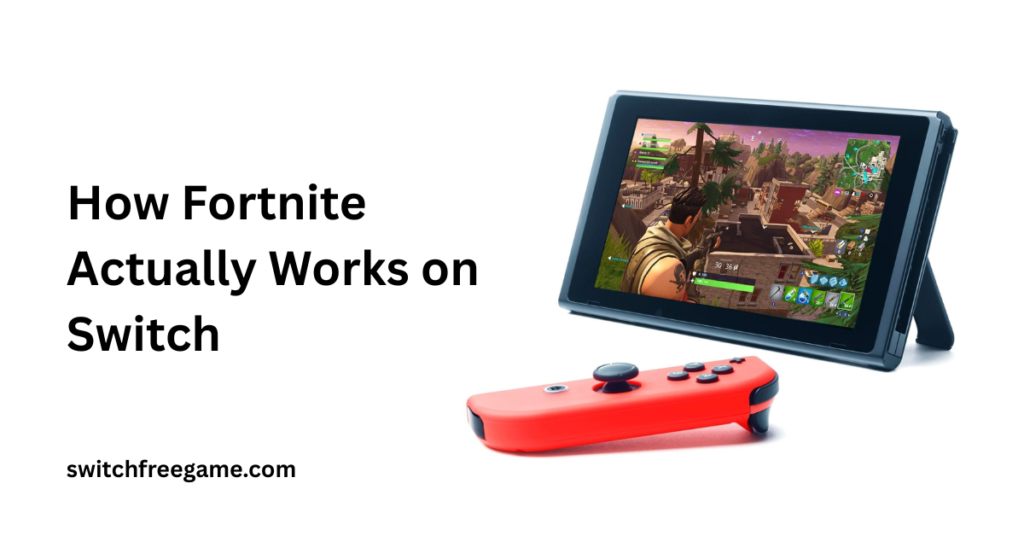
How Fortnite Actually Works on Switch
Let’s talk about what you’re actually getting when you download Fortnite for free. The game has several modes, all completely accessible without payment.
Battle Royale is the main attraction 100 players drop onto an island, scavenge for weapons and materials, and fight until one player or team remains. The map shrinks over time through a closing storm, forcing encounters. Matches last around 20 minutes if you make it to the end, though you might get eliminated earlier. It’s intense, competitive, and surprisingly strategic.
Creative Mode lets you build your own islands and game modes using Fortnite’s building tools. People have created everything from obstacle courses to fully functioning RPGs within this mode. It’s wild what the community has built, and it’s all free to explore and play.
Zero Build mode is a newer addition that removes the building mechanic for players who just want a more traditional shooter experience. This was a game-changer for people who felt overwhelmed by the building skill gap.
So how does Epic Games make money if everything’s free? V-Bucks, the in-game currency. You can buy them with real money, and they’re used to purchase cosmetic items from the rotating Item Shop. A new skin might cost 1,200-2,000 V-Bucks (roughly $12-20). The Battle Pass costs about 950 V-Bucks each season.
Here’s what I appreciate about this model: they’re completely transparent about it. There’s never a moment where you’re surprised by a cost. Everything gameplay-related is free. Want that cool Iron Man skin? That’ll cost you. But want to compete at the highest level using default skins? Completely possible, and plenty of top players do exactly that.
The value for users is undeniable. I’ve played Fortnite for years, spent maybe $50 total on cosmetics because I wanted to support the game and look cool, and I’ve gotten thousands of hours of entertainment. Compare that to buying 10-15 full-price games over the same period, and the math works out heavily in favor of the free model.
Best Free Games on Switch Right Now
While Fortnite is the obvious answer when people ask about free switch games, there’s a whole ecosystem worth exploring. Let me walk you through what’s actually worth your time in 2026.
Apex Legends is probably the closest competitor to Fortnite in the battle royale space, but it has a very different feel. It’s faster-paced, more tactical, and focuses on team-based play with unique characters called Legends. Each Legend has special abilities that create interesting team compositions and strategies. If Fortnite’s building mechanic doesn’t appeal to you, Apex might be your speed. The gunplay feels tighter and more competitive.
Rocket League is something special—car soccer sounds ridiculous until you play it, and then you’re hooked. It’s one of those “easy to learn, impossible to master” games where you’ll be having fun immediately, but the skill ceiling is so high that professional matches look like a completely different game. Five-minute matches make it perfect for quick gaming sessions on Switch.
Warframe is for people who want something deeper. It’s a sci-fi looter-shooter with thousands of hours of content, complex progression systems, and regular massive updates. The learning curve is steep, but the community is welcoming and the gameplay is genuinely unique. If you like grinding for loot and customizing your character with different abilities and weapons, this is your jam.
Pokémon Unite simplifies the MOBA genre (think League of Legends) into something accessible and quick. Matches last 10 minutes, the strategy is easier to grasp than traditional MOBAs, and it’s Pokémon, which helps. It’s not as deep as PC MOBAs, but that’s kind of the point—it’s designed for the Switch audience.
Fall Guys is pure chaotic fun. It’s basically Wipeout or Takeshi’s Castle as a video game silly obstacle courses with 60 jellybean-shaped characters bouncing around, trying to qualify for the next round. It’s great for when you want something light and funny that doesn’t require intense focus.
Each of these games represents hundreds of potential hours of entertainment without spending a cent. They all have active communities, regular updates, and fair monetization models where cosmetics are optional. Download them all and see what sticksthat’s the beauty of free games.
Downloading Fortnite: The Actual Process
Alright, let’s get practical. Here’s exactly how to get Fortnite on your Nintendo Switch, step by step, written like I’m talking to my friend who’s never done this before.
Step 1: Check Your Storage
Before anything else, go to System Settings on your Switch home screen. Scroll down to Data Management and check how much free space you have. Fortnite needs about 30GB, and you’ll want some extra room for updates. If you’re running low, consider getting a microSD card. I use a 256GB card and it’s been perfect. They’re not expensive, and they make a huge difference.
Step 2: Get Your Account Ready
From the home screen, press the icon of your user profile in the top left corner. If you haven’t created a Nintendo Account yet, do that now. It’s free and takes maybe five minutes. You’ll need an email address. If you’re under 13, you’ll need a parent to set this up. It’s annoying but necessary.
Step 3: Open the eShop
See that orange shopping bag icon on your home screen? That’s the Nintendo eShop. Click it. If multiple profiles use your Switch, select the one with the Nintendo Account you just set up.
Step 4: Search for Fortnite
At the top of the eShop, there’s a search bar. Click it and type “Fortnite.” It should pop up immediately. The publisher will say Epic Games. Make sure you’re getting the right one there are sometimes clones or unrelated games with similar names.
Step 5: Download It
Click on Fortnite and you’ll see a “Free Download” button. Press it. Accept any terms that pop up. The download will start automatically. Depending on your internet speed, this might take 30 minutes to an hour. You can put your Switch in sleep mode and it’ll keep downloading.
Step 6: Create Your Epic Games Account
This is important. When you launch Fortnite for the first time, it’ll ask you to sign in or create an Epic Games account. This is separate from your Nintendo Account. If you’ve played Fortnite on another device before, sign in with that same Epic account to keep your progress and cosmetics. If you’re new, create an account. Use an email you actually check because they’ll send verification emails.
Step 7: Link Everything
After creating or signing into your Epic account, it’ll ask if you want to link your Nintendo Account. Say yes. This lets you play online and ensures everything is properly connected. You might need to verify on a browser or phone—just follow the prompts.
Step 8: Go Through the Tutorial
The game will walk you through basic controls. Don’t skip this even if you’ve played other shooters. Fortnite’s building mechanic is unique, and the tutorial helps you understand the basics. It’s like 10 minutes, and it’ll save you from being completely lost in your first match.
Step 9: Jump Into a Match
After the tutorial, you’re ready. Start with regular Battle Royale or Zero Build mode if building seems overwhelming. Your first few matches will include some bots mixed with real players, which helps you learn without getting destroyed immediately.
Pro Tips: Turn on voice chat if you want to communicate with teammates. Adjust your sensitivity settings in the options—Switch’s Joy-Cons are different from other controllers, and finding the right sensitivity makes a huge difference. And don’t stress about winning your first matches. Everyone gets eliminated a lot when they start. It’s part of the learning process.
What’s Actually Trending in 2026
The world of free switch games keeps evolving, and 2026 has brought some interesting developments that change how we experience these games.
Cross-progression has become universal. Basically every major free game now lets you play on Switch, then continue on your phone, then jump on PC, all with the same account and progress. This seemed like magic a few years ago, but now it’s just expected. I love being able to start challenges on my morning commute, then finish them at home on the big screen.
The seasonal model has gotten more sophisticated. Fortnite pioneered this, but now every major free game operates on seasons that last 2-3 months. Each season brings new content, storylines, cosmetics, and gameplay changes. It keeps things fresh in a way that traditional games can’t match. The downside is FOMO (fear of missing out) when limited-time items appear, but that’s part of the business model.
Battle Passes have become more generous. A few years ago, free Battle Pass tracks were basically useless. Now, you can get legitimately cool stuff without paying. And if you do buy the premium pass, most games give you enough premium currency to afford next season’s pass if you complete it. Fortnite definitely does this—I bought one Battle Pass years ago, and by completing it each season, I’ve earned enough V-Bucks to buy every subsequent pass without spending more real money.
Community-created content is exploding, especially in Fortnite Creative. People are building entire games within the game. There are horror maps, racing games, puzzle games, RPG experiences—stuff that’s honestly as good as standalone indie games. And it’s all free to play. The Switch handles most of this pretty well, though some complex Creative maps can push the hardware.
Accessibility features have improved dramatically. Most free games now have colorblind modes, customizable controls, adjustable difficulty settings, and better tutorials. This makes them more welcoming to players who might have been excluded from gaming in the past.
Performance on Switch has gotten better too. Developers have learned how to optimize for Nintendo’s hardware. Fortnite runs way smoother in 2026 than it did at launch. The graphics still aren’t PC-level, obviously, but the frame rate is stable and the experience is solid.
Cloud gaming is starting to show up for certain games, though Fortnite runs natively on Switch. Some free games are using cloud streaming to deliver experiences beyond what the Switch hardware could normally handle. It’s interesting technology, but you need a really solid internet connection for it to work well.
Frequently Asked Questions
Q1: Do I need Nintendo Switch Online to play Fortnite?
No. Most free-to-play games like Fortnite don’t require a Nintendo Switch Online subscription. These games use their own servers, so you can play online completely free.
Q2: Are there hidden costs in free Switch games?
No hidden costs. Games like Fortnite are truly free to play. Optional cosmetic purchases exist, but they don’t affect gameplay. You can compete at the highest level without spending anything.
Q3: Can I play with friends on other consoles?
Yes. Fortnite supports full cross-platform play across Switch, PlayStation, Xbox, PC, and mobile. Just add friends using their Epic Games username and play together regardless of device.
Q4: How much storage does Fortnite need?
Fortnite requires about 30GB of storage space. Regular updates add more, so consider getting a microSD card (128GB or larger) if you plan to download multiple games.
Q5: Is Fortnite safe for kids?
Fortnite is rated T for Teen (13+) but features cartoon-style violence with no blood or gore. Use Nintendo’s parental controls app to restrict purchases and manage playtime.
Latest Post